





TikTok’s looking to make it easier to stream with multiple camera angles, by enabling users of its TikTok Studio desktop streaming set-up to easily connect their phone, or a friend’s device (or even an iPad), as a second camera.
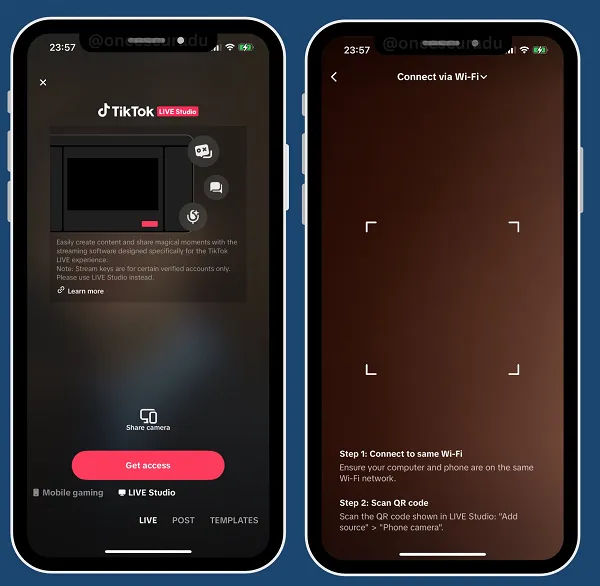
As you can see in these example screens, shared by app researcher Radu Oncesu, within the set-up process for your desktop TikTok Live stream, in the TikTok Studio app, you can now simply scan in the QR code displayed within the app screen via your phone’s camera to link up the two devices.
To be clear, you’ve been able to use two cameras for your streams via TikTok Studio for some time, but this will make it easier for people to plug and play with their mobile device, which could enable a lot more users to stream via two angles at once.
Which will be particularly beneficial for gaming streamers.
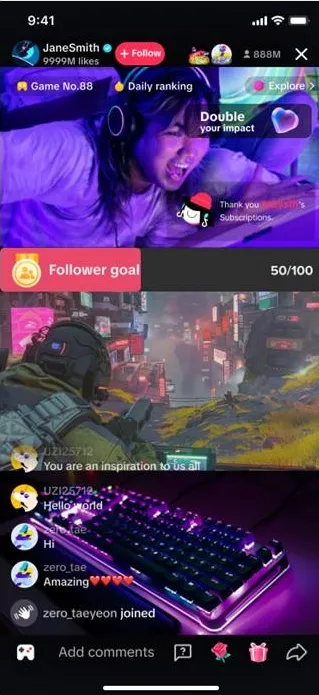
Many TikTok gaming streams only display the gameplay, as not everyone has the technical know-how, or system capacity, to utilize two cameras.
This will make that a much more viable option, for many more users, which should ensure that more streamers show their face, making for more engaging live broadcasts, and more community building in the app.
It could also be handy for shopping streams, and behind-the-scenes style content, giving all users an easy way to connect two cameras for more context.
There’s a range of ways this could be used, and the simplified connection will open up much more capacity for creators to tap in.
It’s another consideration for your process, and with TikTok’s live streams gradually gaining traction, it could be worth assessing whether it might fit into your platform strategy.

AI Video Editing: Save Time and Create Better Videos
Are you avoiding video because you think the production is too time-consuming or expensive? Want to use AI video tools...

LinkedIn Is Rewriting the Rules of Visibility
Are you watching AI tools send leads to your competitors while your LinkedIn presence sits idle? Wondering whether the new...

How to Gain Superpowers With AI
Tired of not seeing real results from AI experiments in your day-to-day work? Wondering how to use AI to fundamentally...
Jury finds Meta and YouTube guilty of causing social media addiction
The plaintiff was awarded $6 million in damages following a California trial that focused on intentionally designed systems such as...


