




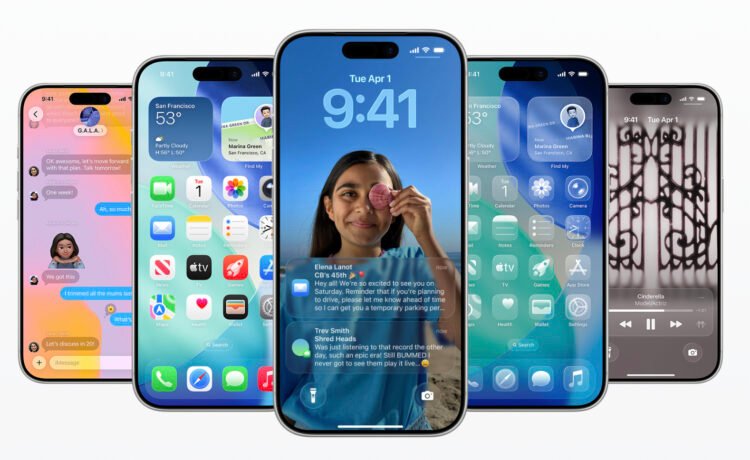
The first big change is with all of the software naming. Instead of iOS 19, Apple has moved to a year naming system. So it’s iOS 26. That applies to all of the other software versions.
Along with a new name is a significant updated design. Apple is calling it Liquid Glass. The translucent material reflects and refracts surroundings to bring content into better focus. It’s a significant change, but something that Apple seems to have well thought out as it extends to all of the new software.
As you probably expected, Apple has made some big upgrades to Apple Intelligence. Live Translation is built into FaceTime and Messages to help communicate across languages. Visual Intelligence has now been extended to the entire iPhone screen.
Shortcuts have also been powered up with Apple Intelligence. It will also ID and summarize order tracking details sent from merchants. Developers can use a new Foundation Models framework to use Apple Intelligence privately and offline.
The phone part of the iPhone know shows a unified layout with Favorites, Recent, and Voice Mail. Call Screening will ask users questions to see if they want to pick up or ignore the call.
Another popular part of the iPhone, Messages, is also sporting new features. You can screen messages from unknown senders. They will appear in a dedicated folder and remained silenced until accepted.
You can download the update by going to Settings > General > Software Update on your iPhone. iOS 26 is compatible with modern iPhones starting with the second-generation iPhone SE.
On the iPad, expect much more of a Mac-like interface. A new window system allows you to resize apps and place them exactly where you want. A menu bar allows you to find a specific feature or tip along with accessing commands.
You can upgrade to iPadOS 26 with the iPad Pro (M4), iPad Pro 12.9-inch (3rd generation and later), iPad Pro 11-inch (1st generation and later), iPad Air (M2), iPad Air (3rd generation and later), iPad (7th generation and later), and iPad mini (5th generation and later).
Download iPadOS 18 by going to to Settings > General > Software Update on your iPad.


Calun Provides a Unique Month-View Calendar Experience
Instead of a day-by-day look, the app provides a monthly look at your schedule. A feature highlight is the one-swipe...

Sid Meier’s Civilization VII Highlights Apple Arcade Additions in February
Three other new games will also be joining the service on that day. First up, go back in time with...
Bullseye Provides a Better Way for Developers to Interact With Apple Ads Campaigns
And the new app Bullseye provides a full-fledged way to use the platform without having to login to the Apple...

Apple Creator Studio Announced With Host of Creative Apps for iPad, Mac
Here’s what you’ll receive as subscriber: Pixelmator Pro, Final Cut Pro, and Logic Pro and Mac and iPad Motion, Compressor,...


