




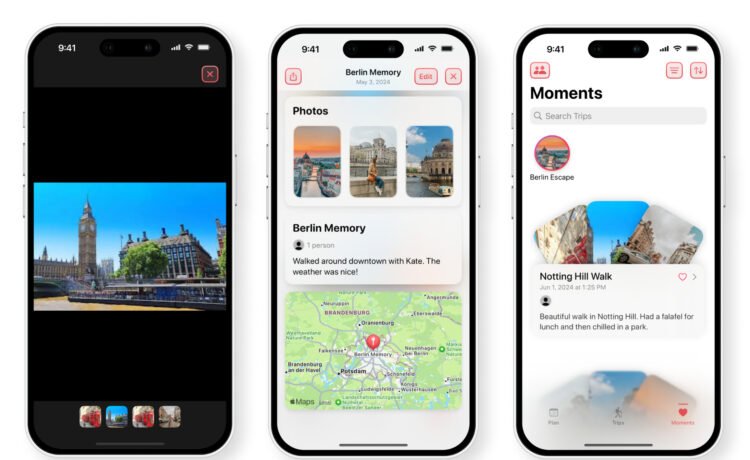
You can start using the app even before your trip. To start the entry, you’ll choose where you are going, the dates, a title, and summary of the journey.
During the trip, you can add an unlimited amount of moments. Those are special parts of the trip that you want to remember for later. You can add up to five photos along with a title, summary, and date/time.
As a nice touch, you can also add specific people who were on the trip. It’s also easy to share the trips and moments with others.
After using the app on a number of trips, you can view moments by specific trip, a year, or even from a country you choose.
The app can be used without an Internet connection so you can add information in out-of-the-way places. Data entered into the app is never shared and encrypted.
Journey: Trip Memories & Diary is a free download now on the App Store. There are no in-app purchases or subscription needed.
Sometimes the best apps keep it simple. And that’s definitely that case with Journey. It’s well-designed and easy to use. I’m excited to use it to add memories from my next trip.


Calun Provides a Unique Month-View Calendar Experience
Instead of a day-by-day look, the app provides a monthly look at your schedule. A feature highlight is the one-swipe...

Sid Meier’s Civilization VII Highlights Apple Arcade Additions in February
Three other new games will also be joining the service on that day. First up, go back in time with...
Bullseye Provides a Better Way for Developers to Interact With Apple Ads Campaigns
And the new app Bullseye provides a full-fledged way to use the platform without having to login to the Apple...

Apple Creator Studio Announced With Host of Creative Apps for iPad, Mac
Here’s what you’ll receive as subscriber: Pixelmator Pro, Final Cut Pro, and Logic Pro and Mac and iPad Motion, Compressor,...


