




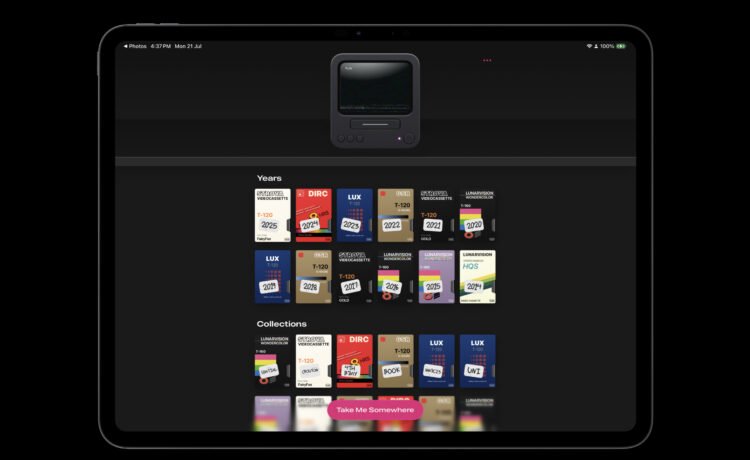
After opening the app, you’ll see each available year as a VHS cassette with a sticky note. Select a year, and a random video from the year will start playing on a retro TV screen and VCR
Just tap the video to see it on the full screen of your device. On the screen, you will also see the date, time, and where exactly the video was shot.
Along with an iOS device, you can even use AirPlay to watch the video on a big screen.
Like with photos, I take a lot of videos with my iPhone. But many times, once the video is shot, I never go back and actually watch the results. Cassette provides an easy-to-use and well-designed way to take a trip through time. Now that my children are quickly growing older, it was a treat to see some of the resurfaced videos of them as babies.
Cassette is a free download now on the App Store for the iPhone and all iPad models. There is an optional subscription of $0.99 per month, $5.99 per year, or $7.99 for a lifetime unlock.
Subscribers can manually select videos to play instead of just a random video playback from the specific year.


Calun Provides a Unique Month-View Calendar Experience
Instead of a day-by-day look, the app provides a monthly look at your schedule. A feature highlight is the one-swipe...

Sid Meier’s Civilization VII Highlights Apple Arcade Additions in February
Three other new games will also be joining the service on that day. First up, go back in time with...
Bullseye Provides a Better Way for Developers to Interact With Apple Ads Campaigns
And the new app Bullseye provides a full-fledged way to use the platform without having to login to the Apple...

Apple Creator Studio Announced With Host of Creative Apps for iPad, Mac
Here’s what you’ll receive as subscriber: Pixelmator Pro, Final Cut Pro, and Logic Pro and Mac and iPad Motion, Compressor,...


