




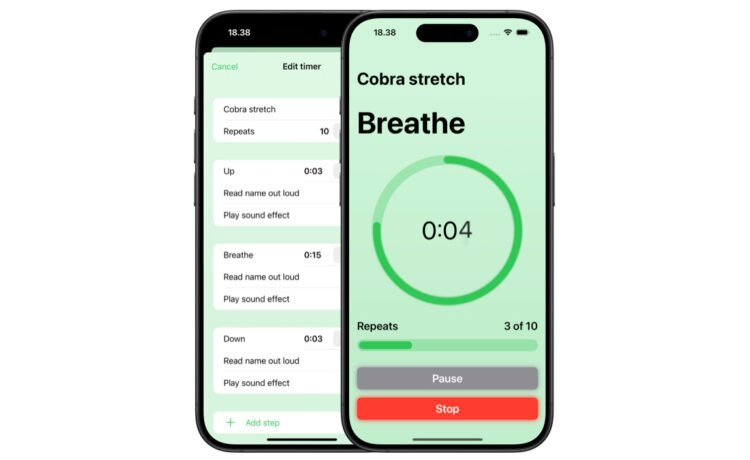
Whether you’re looking to create a set of timers for a workout, physiotherapy, study sessions, or something else, the app makes it easy.
Add a timer and then add a name, you can then add how many times it should repeat. For each repeating option, you can optionally add a name, have the app read out the name, or a sound effect.
Adding a name can help you better define each step.
ClickClock is a free download on the App Store now. It’s for the iPhone and all iPad models.
An optional, $2.99 in-app purchase will unlock the ability to create an unlimited number of timers and use a variety of alternative app icons. With the free version, you can create up to three timers.
For anyone who needs to create a multi-step timer, ClickClock is pretty much perfect. With just a few steps, I had created a long timer chain to break up different tasks at work.


Calun Provides a Unique Month-View Calendar Experience
Instead of a day-by-day look, the app provides a monthly look at your schedule. A feature highlight is the one-swipe...

Sid Meier’s Civilization VII Highlights Apple Arcade Additions in February
Three other new games will also be joining the service on that day. First up, go back in time with...
Bullseye Provides a Better Way for Developers to Interact With Apple Ads Campaigns
And the new app Bullseye provides a full-fledged way to use the platform without having to login to the Apple...

Apple Creator Studio Announced With Host of Creative Apps for iPad, Mac
Here’s what you’ll receive as subscriber: Pixelmator Pro, Final Cut Pro, and Logic Pro and Mac and iPad Motion, Compressor,...


