




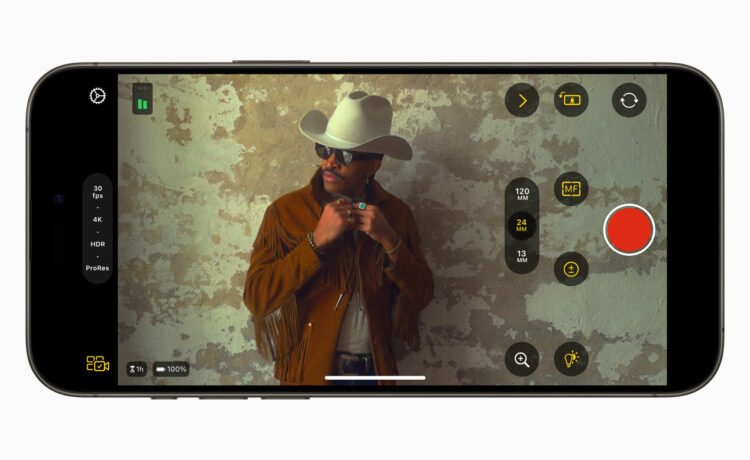
One of the big draws of the app is its compatibility with Final Cut Pro. You can start a Live Multicam session by connecting up to four devices running the video app to preview, record, and sync video angles in Final Cut Pro for iPad.
You can instantly edit multicam clips with a preview media that is automatically synced in the Final Cut Pro browser.
Even if you don’t use Final Cut Pro, the app is a perfect way to bring professional-grade controls to shooting video.
Some of the customizable settings include shutter speed, ISO, white balance, and manual focus, resolution, frame rate, and color space.
To help reduce shakiness and movement, you can also enable stabilization through the app.
Other controls include focus peaking to help record sharp footage, properly exposed video with zebra indicators, and aspect ratio guides or grid overlays to help you compose and frame a shot.
Videos can be saved to the Files app or recorded directly to an external storage device.
Final Cut Camera is a free download for the iPhone and all iPad models.


Calun Provides a Unique Month-View Calendar Experience
Instead of a day-by-day look, the app provides a monthly look at your schedule. A feature highlight is the one-swipe...

Sid Meier’s Civilization VII Highlights Apple Arcade Additions in February
Three other new games will also be joining the service on that day. First up, go back in time with...
Bullseye Provides a Better Way for Developers to Interact With Apple Ads Campaigns
And the new app Bullseye provides a full-fledged way to use the platform without having to login to the Apple...

Apple Creator Studio Announced With Host of Creative Apps for iPad, Mac
Here’s what you’ll receive as subscriber: Pixelmator Pro, Final Cut Pro, and Logic Pro and Mac and iPad Motion, Compressor,...


